3 minute read | Last update: December 5, 2025
Summarize with AI


Do you need to remove a PDF signature? This allows you to finalize a corrected version of your file, ready to share.
In this guide, you’ll learn how to remove a signature from a PDF. Edit your document without starting over or requesting a new copy.
Table of Contents
▼
Table of Contents
▼Can You Remove a Signature from a PDF?
It depends on how the signature was added and the document’s permissions. For security reasons, you can only remove your own signature.
Many signed PDFs are sealed to protect their content, and any changes can invalidate the signature. Some PDF tools also enforce strong security measures once a document is finalized.
In general, if the signature is not certified and the PDF is not locked, you can remove it. There are several ways to do this.
How to Delete a Signature from a PDF Using the Erase Tool
You can quickly remove a signature in just a few simple steps. Here’s how to do it using the Erase tool:
-
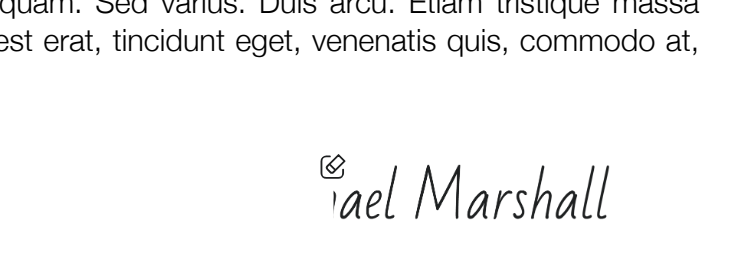
 Access the tool: Go to Edit PDF and upload the document containing the signature.
-
 Select “Erase”: Click the “Erase” button in the main toolbar.

-
 Delete the signature: Use the Erase feature to remove the signature.
-
 Save your changes: Save or download the document once the signature is no longer visible, or continue editing if that was your original purpose.
How to Remove a Signature from a PDF Using the Redact Tool
You can also redact an electronic signature in a PDF. Here’s how:
-
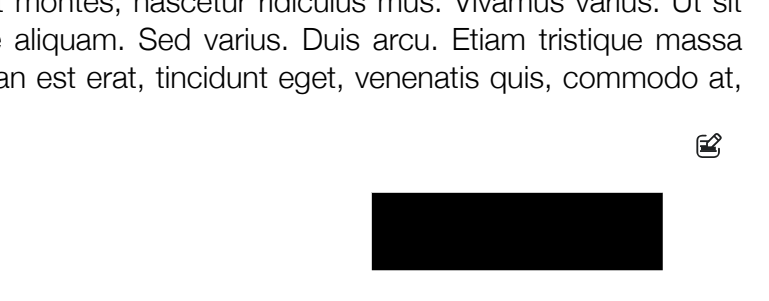
Access the tool: Go to Redact PDF and upload the PDF containing the signature.
-
Select “Blackout”: Click the “Blackout” button in the main toolbar.

-
Make adjustments: Adjust the area that will hide the signature.
 [
[ -
Save your changes: Save or download the document once the signature is no longer visible, or continue editing if that was your original purpose.
Save or download the document once the signature is no longer visible, or continue editing if that was your original purpose.
FAQs About Removing a Signature from a PDF
Is it legal to remove a signature from a PDF document?
Toggle faqs
It depends. Removing someone else’s signature without their consent is considered unethical and might violate legal or security policies. For this reason, you’re only allowed to remove your own digital signature. If the document is legally binding or shared with others, always obtain consent before making any changes.
Can I remove a signature from a locked PDF?
Toggle faqs
Usually, no. Once a PDF is certified or finalized, it’s locked to protect its legal integrity. Any changes require the original unlocked file or permission from the person who locked it or applied the final signature.
Can I restore a signature that I accidentally deleted?
Toggle faqs
Once a signature is deleted and the document is saved, it cannot be easily recovered. This action is generally irreversible. To restore the signature, you’ll need to revert to a previously saved version of the PDF or re-sign the document.
Can I remove signatures from a PDF on a Mac using Preview?
Toggle faqs
If you save and close a PDF after adding a signature, the signature becomes part of the document’s content and cannot be edited in Preview. To remove it, you’ll need to use tools such as those provided by PDFinity.
More Tools You Can Discover on Our Site
PDFinity offers a full range of tools for editing and converting PDFs. Here are some of its features:
- Sign a PDF: Not just for removing signatures. Easily sign documents with a PDF signature tool.
- Add a watermark: Protect the content of your PDF. Add a custom watermark to establish ownership or indicate how the file should be used.
- Annotate a PDF: Add notes or highlight important sections that need to be changed. Make sure your document is ready before sharing.
- Organize PDF pages: Rearrange pages in the correct order or split a large file into smaller parts. Create a structured, organized document that’s easy to review.
Find all the PDF tools you need to manage your documents effortlessly. No downloads or extra software required. Simplify your file management and improve your workflow.
Share this article